
How can we avoid generic slop when building AI prototypes?
Generative AI models have learned to compress the world from their training data. In this model, there is a specific idea of what a UI looks like—bland, average, and usually purple.
To design standout experiences with AI prototyping tools, we need to guide these models away from that generic look.
Over the last few months, I've given training workshops on AI prototyping for design teams from companies like Reaktor in Helsinki/Amsterdam, Uphold in Porto, and Sonar in Geneva. I've seen how, with the right training and guidance, designers can use their own taste to produce truly standout user experiences.
In this article, we'll cover three key principles for creatively directing AI prototyping tools like Lovable and Google AI Studio:
- Have a creative vision
- Guide with references
- Scale with a design system in code
Principle 1: Have a creative vision
AI slop was just chosen by Webster as the word of 2025. The term applies to UIs created with these tools—typically bland, boring, and, for some reason, always purple.
Here's the result of a generic prompt to create a simple online timer:
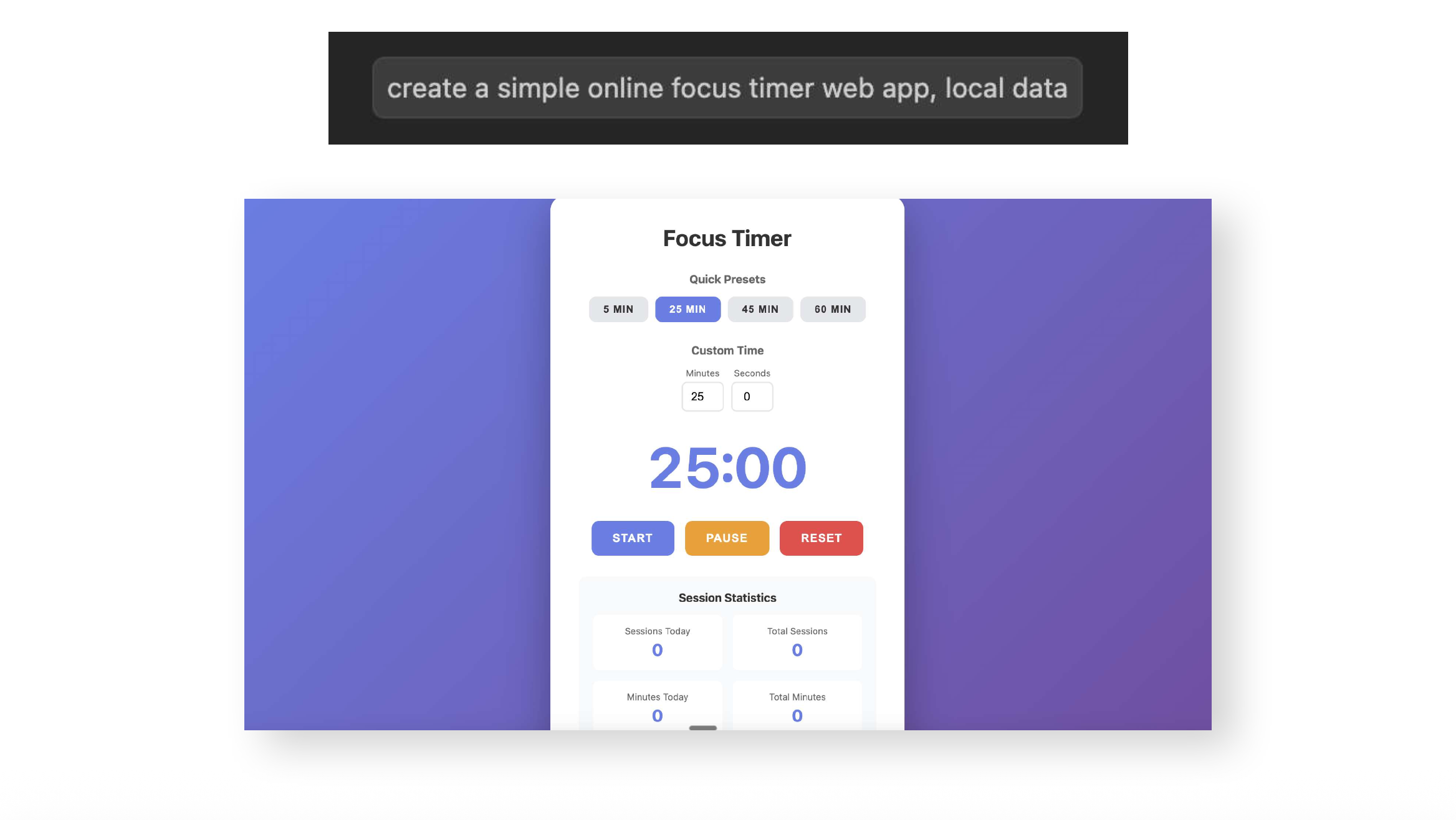
These models have no inherent taste or creative bar. They are getting increasingly adept at the basics of good design—hierarchy, spacing, and alignment. Yet when it comes to distinctiveness, they default to an average medium. It makes sense; they have no way of knowing the specific experience you're after.
It's up to us as design professionals to guide them with our taste. So the first step in working with an AI prototyping tool is to have a clear creative vision ourselves. What is the standout experience we want to create?
We can define this vision on paper, jump into Figma to create images, or look for reference images online. Only with a clear and distinctive creative vision can we hope to guide our AI prototyping tools to standout results.
In the world of rapid AI prototyping, we still need to be guardians of good taste. We also need to cultivate it as professionals - study and appreciate standout taste. As building gets easier, it’ll take more to make digital experiences stand out.
Principle 2: Guide with references
For my timer example, I had a specific vision for an ultra-minimal, sleek timer inspired by the classic look of Braun clocks.
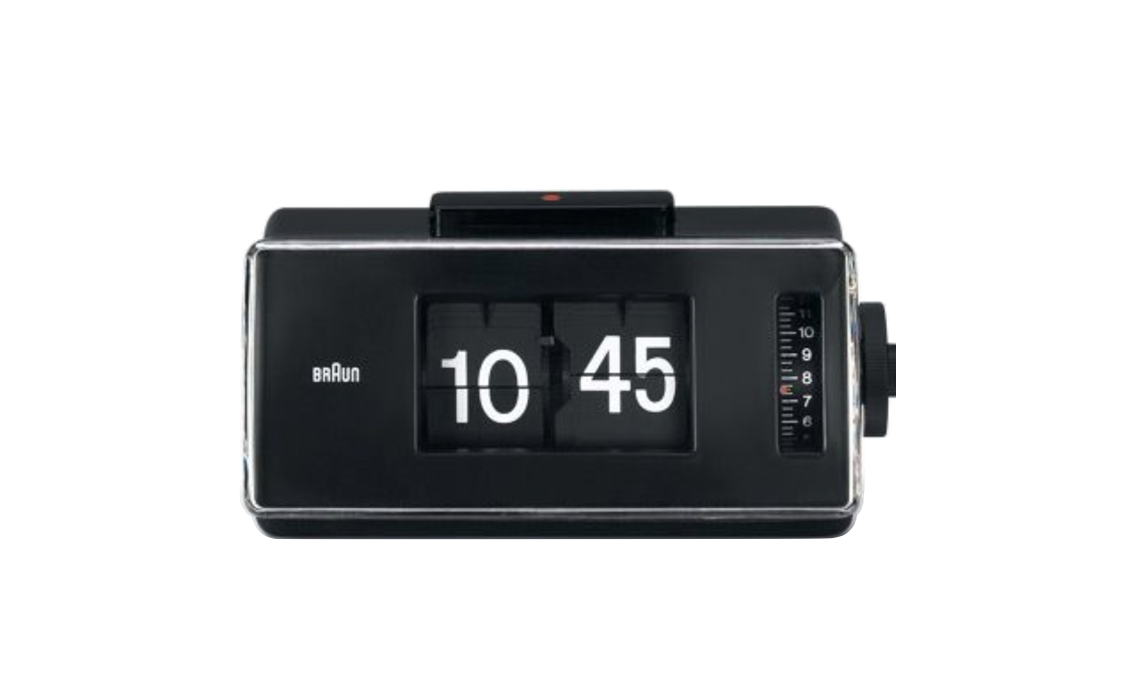
To guide Claude Code (the AI prototyping tool I was working with), I included the above image as a reference, along with a prompt describing the experience I was after. I specifically asked Claude to take inspiration from the classic clock, but reinterpret it for the web.
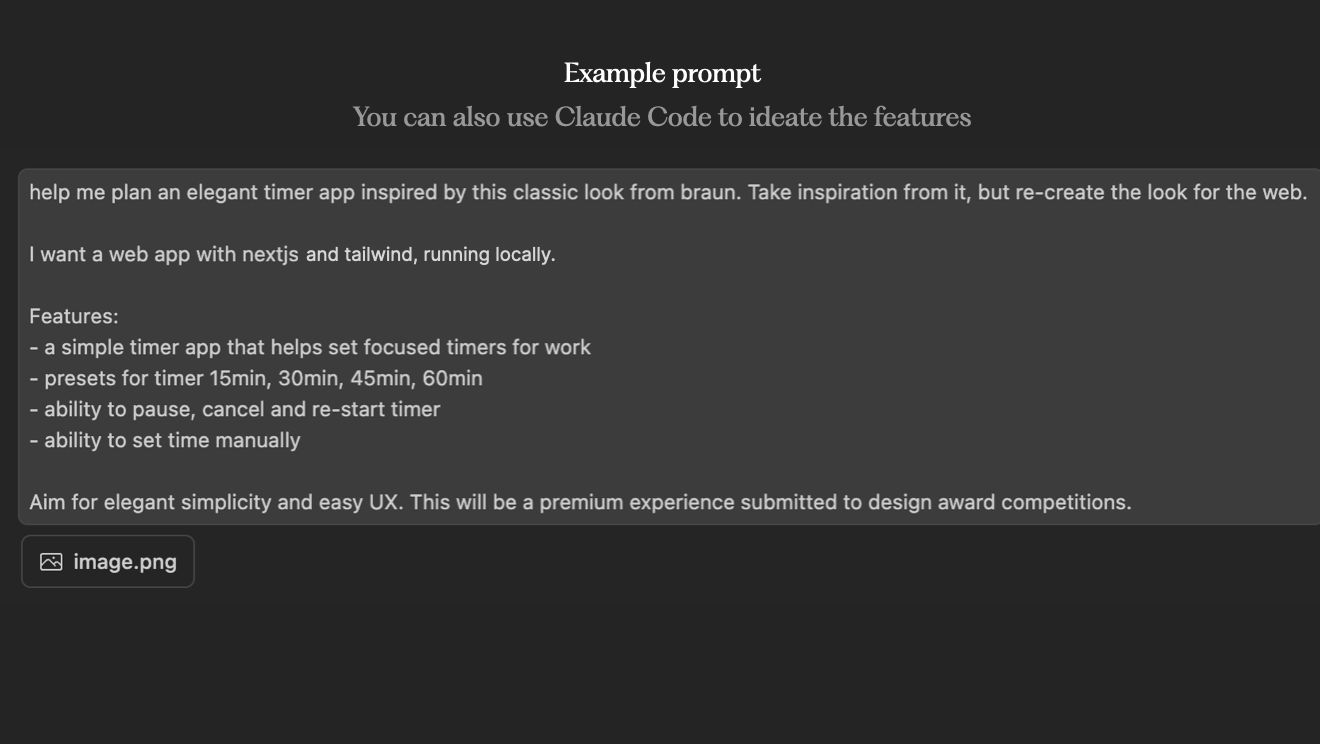
I also pushed the experience quality with the silly-sounding hack of telling it the result would be "submitted to design award competitions." Setting the quality bar with these statements can help the model push beyond the generic.
It also pays off to have opinions on the technical approach. This isn't mandatory, but it helps the model create more modern interactions. I told the model to use "Next.js and Tailwind"—a pair of modern front-end frameworks that enable richer experiences than plain HTML and JavaScript.
After a few corrective prompts, Claude Code generated a minimal timer with sleek animations, drawing inspiration from the classic Braun clock without copying it. The higher quality our creative direction—using both relevant reference images and text—the better the result.
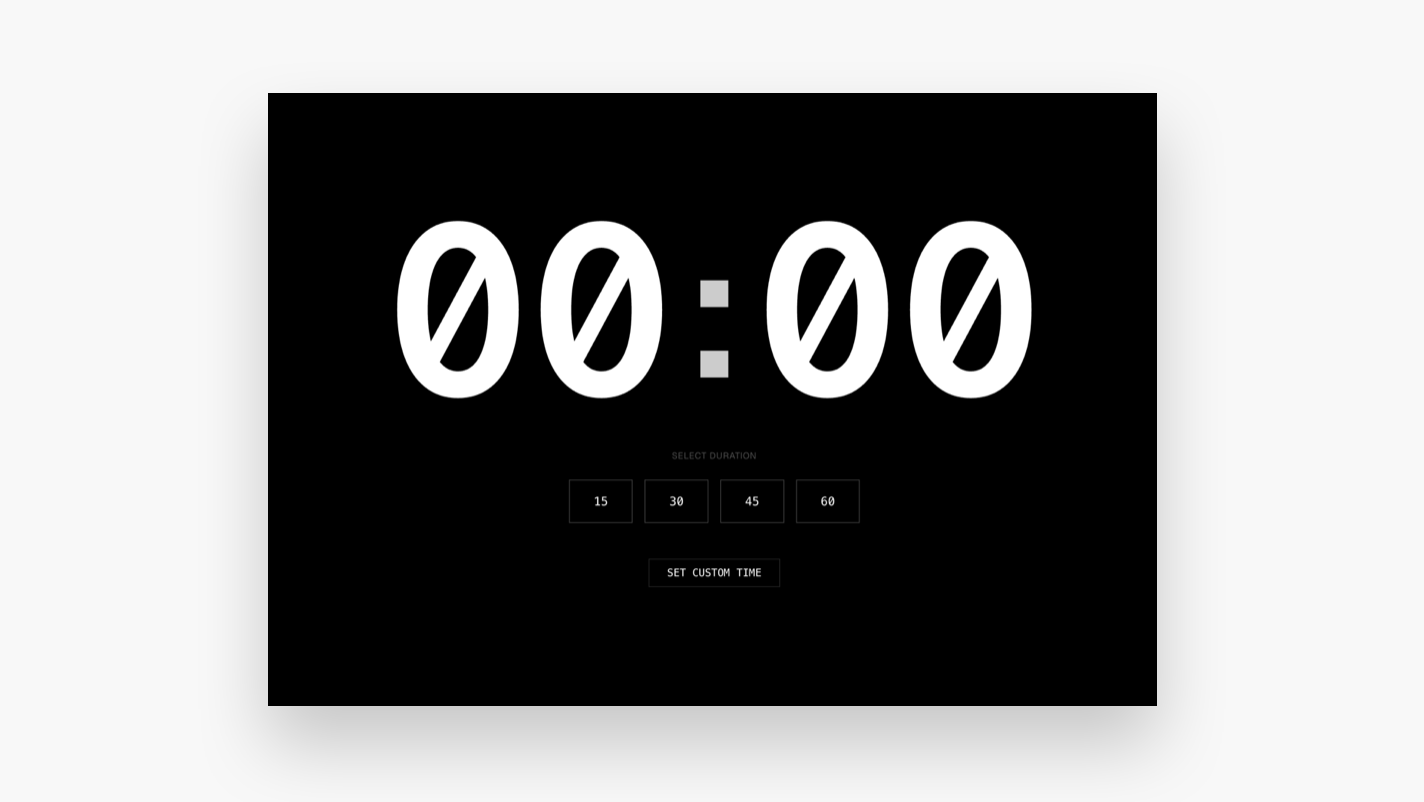
Leading AI prototyping tools like Claude Code and Google AI Studio are becoming extremely adept at following a clearly defined style. They can also combine elements—structural choices from one reference and visual style from another.
I've seen this countless times in my workshops: with specific and well-structured guidance, AI prototyping tools can generate jaw-dropping results.
The point isn't to copy exact designs from sources like Mobbin or Pinterest, but to use several references as creative starting points to create something completely new.
The biggest strength of these tools is that they are an infinite canvas for exploration—enabling us to rapidly diverge into countless creative directions. It's up to us to use the prototypes as inspiration and often jump back into Figma for the last 20% of polish and unique craft.
Principle 3: Scale with design systems in code
Over the last decade, the design community has addressed many efficiency and consistency issues with robust design systems. Now, we can lean on these design systems as we enter the AI prototyping era.
Only the design systems will not live only visually in Figma—they need to be converted to the language of machines: code.
To generate on-brand AI prototypes, it's important to define a design system in a structured format that AI models can understand.
The good news is that these same AI prototyping tools can help create the design system. Here's an example prompt:
"Create a robust design system based on these visual references. Add it as a designsystem.json file in this repo. Include both higher-level principles and specific design tokens. Any AI model should be able to recreate this style using this design system."
As a reference, we can include UIs or better yet, screenshots of our design system from Figma. The MCP connection in Figma is an option for doing this programmatically, but I've found it too unstable and token-dense to be effective. The output from this prompt will be a structured JSON data file. It translates a visual style into structured code that any AI model can easily interpret. To get fancy, you can also look into packaging your design system as a scalable solution like Claude Skills—so that every design your team creates adheres to it.
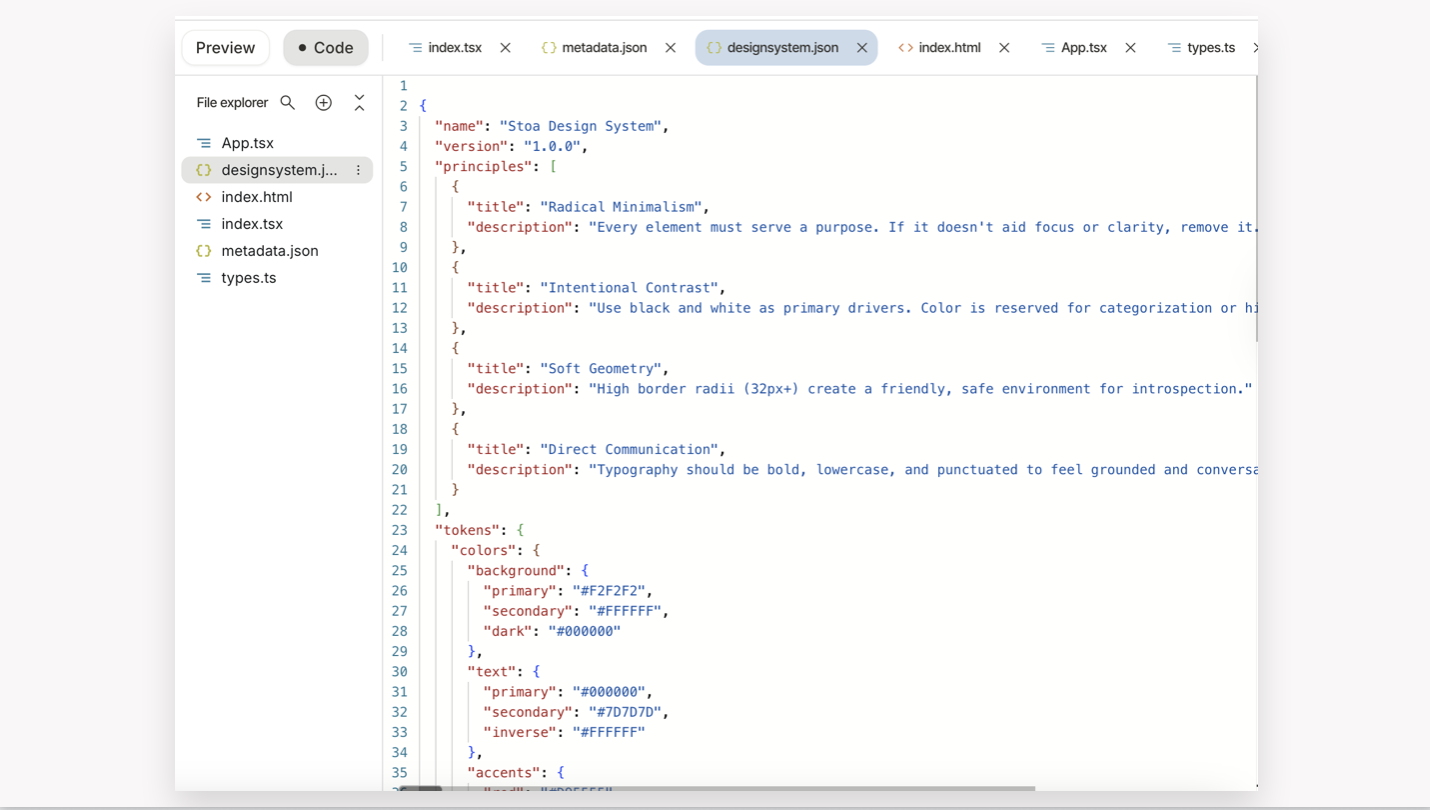
This file can be shared with the team as a starting point for all AI prototyping. The results will not be perfect, but close enough to rapidly explore UX directions with a realistic brand experience.
Getting started with AI prototyping
If you're interested in getting started, here are a few practical steps:
- Choose a powerful but easy-to-try tool like Lovable or Google AI Studio
- Try generating a simple tool like an online timer or to-do app with no creative direction
- Search for a specific visual reference of a style you'd like to achieve
- Create a new project, but this time add your reference image to guide the model
This simple exercise will help you experience firsthand how to creatively direct these models. As you get more comfortable, you can start exploring how to create a JSON design system for your team.
For the most capable AI prototyping experience now, I recommend graduating from easier tools like Lovable to Claude Code (with Opus 4.5) or Google's Antigravity using Gemini.
These tools require getting comfortable with an IDE coding environment, but they are less daunting then they look. Claude Code is also available in the desktop version of the Claude app.
Keep the insights coming.
Author